
The fundamental topics in this section underpin most of your communication options in AWS. They are essential building blocks for how your servers communicate, how you route traffic between environments, and how you uncover why your traffic reaching its destination.
VPC Creation
- VPC is the fundamental network container for a set of AWS resources (EC2 instances, RDS databases, connections to outside networks) that you define.
- VPC spans an entire region and then breaks down into subnets in different AZs.
- On creation, you assign a private CIDR block (RFC1918 or public IP addresses if you wish but not recommended)
- For IPv4: Max size /16. Smallest size /28.
- For IPv6: fixed size of /56. The address range is assigned by AWS as it comes from their Global Unicast Address space – AWS ip-ranges.
- Dual stack IPv4/v6 is possible, but understand the routing and security groups are handled independently.
- VPC CIDR block cannot be changed after VPC creation. A common exam question here is what to do when you want to change instance IPs to a different CIDR block. The answer is create a new VPC and migrate the instances.
- New accounts always start with a default VPC if 172.31/16 (and no IPv6)
- “DoNotDelete” appears in the name of the default VPC because if you delete it, according to AWS you will experience issues using other AWS services that expect a default VPC to exit – even if that is not where your EC2 instances reside.

Subnets

- The default VPC is then broken up into /20 subnets for each AZ.
- A subnet is a segment of the VPC that must reside within a single AZ.
- Each AZ can have Zero-to-multiple subnets.
- IPv4 max subnet size must be within the VPC CIDR range, and minimum is /28.
- IPv6 subnets are fixed at /64 and can be disassociated and readded later.
- Subnets are classified as
- public: route table must target an Internet Gateway
- private: route table does not contain IGW, but perhaps a NAT Gateway
- VPN-only: route table must target the VPC VGW or EC2 instance vpn
- Default VPC contains one public subnet in every AZ. Default NACL allows everything in and out.
- Default additioan
- .1, .2, .3 are reserved in every VPC subnet. .1 is the gateway, .2 is DNS, .3 future.
- AWS default DNS server runs on the .2 address of the base VPC CIDR range (e.g. 172.16.0.2) and is reachable at 169.254.169.253
- Tags are helpful for identifying subnet use
- The main difference between Public and Private subnets is simply that Public subnets have an IGW and NACL that allows internet flows.
Route Tables
- Default VPC contains a main route table that is used by all subnets.
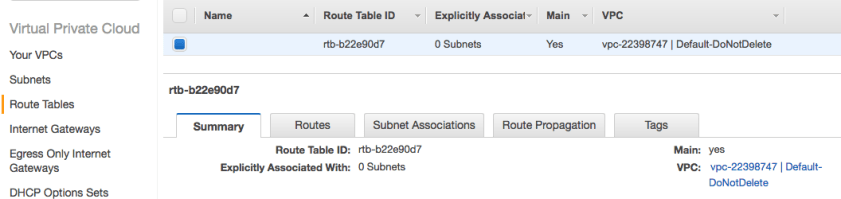
- Every VPC subnet contains an implicit router – the next-hop gateway for the subnet. This can be customized for each subnet, and one of the later recommendations is to have a dedicated route table per subnet for maximum flexibility.
- Route table is the set of route entries used by the implicit router
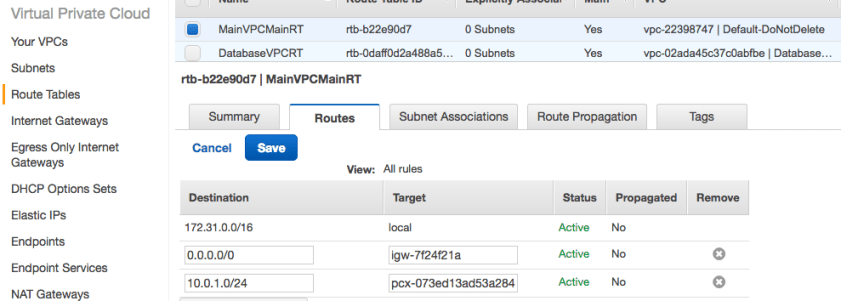
- Targets of route tables (the way out) have special names and can include
- Internet Gateway (igw-qwert123)
- NAT gateway
- egress-only IGW (eigw-qwer123)
- Virtual Private Gateway
- VPC gateway endpoints (vpce-qwert123)
- VPC peers (pcx-qwert123)
- Elastic Network Interfaces
- Targets that are “local” cannot be removed. These are entities on the subnet.
- In general, the Local Routes are preferred first, followed by Longest Prefix routes.
- When there are multiple options for a route, Route Priority is used to prefer:
- 1. Local route (even if more specific route exists)
- 2. Most specific route (longest prefix match)
- 3. Static routes (preferred over dynamic for equal prefix)
- 4. Dynamic routes from Direct Connect
- 5. Static routes configured on a VGW VPN
- 6. Dynamic routes propagated over VPN
- Longest prefix preference is not applied when propagated routes and static routes conflict. Instead the static route is preferred in this order of targets:
- IGW
- VGW
- Network Interface
- Instance ID
- VPC Peering (PX)
- Nat GW
- VPC endpoint
- If you fail to associate a subnet with a specific route table, Main RT is used.
- The Main Route Table cannot be deleted, but you can move subnets to a different route table, and once moved the Old Main can be removed. This can be a nice way to safely stage/test/migrate your Direct Connect environment
- Limits:
- Hard: 200 Routes/VPC
- Default: 50 Non-propaged routes/RT (Max 100 at potential network performance cost)
- Separate (same) limits for IPv4 and IPv6
IPv4 Addressing
- Private (you assign) or Public (assigned from AWS owned IP address space)
- Manually assigned (if within your VPC CIDR) or automatic.
- EC2 primary interface IP addresses are retained until the instance is terminated.
- EC2 instances can also have Elastic Network Interfaces and the private IP is listed as a secondary address on those interfaces (also retained until ENI is deleted).
- EC2 Public IP addresses can be automatically assigned at launch or added later, but you cannot keep an EC2 public IP if the instance is stopped or terminated.
IPv6 Addressing
- Link-local addresses (fe80://10) are required on every interface for DHCPv6, and neighbor discovery. The VPC implicit router expects a modified EUI-64 format where the mac address of an ENI is converted into the interface IP with FF:FE as follows: [first 24 bits of mac]:FF:FE:[second 24 bits of mac]
- Global Unicast Address (public) is allocated for all IPv6 assignments. Because AWS owns these allocations from the relevant Regional Internet Registry, the public IPv6 block is always assigned by AWS starting with a /56 for the entire VPC and /64 for each subnet in each region.
- You can assign the host-level bits for an Elastic Network Interface within your allocated subnet. You can also create an attribute that takes precedence over the automatic assignment and influences the assignment.
- Like IPv4, the IPv6 can be added after launch.
Elastic IP Address
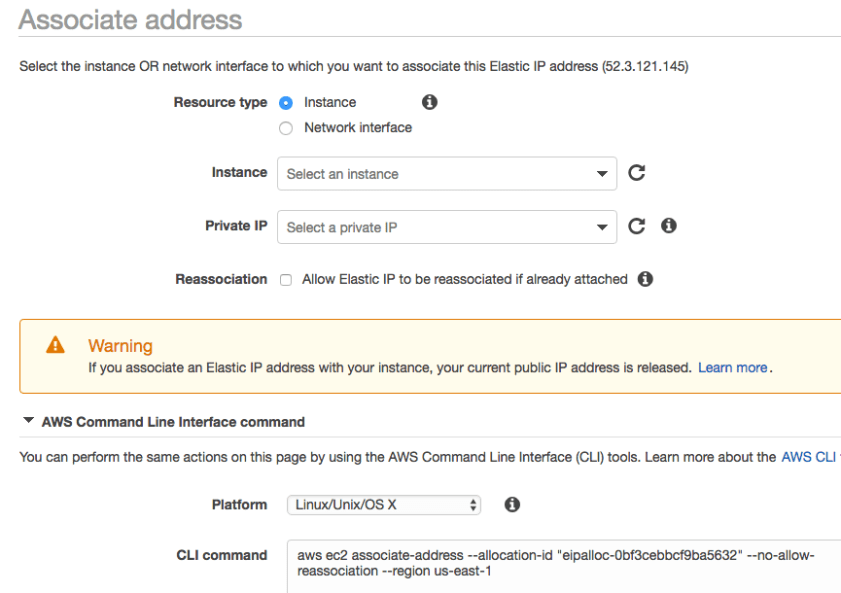
- Static, public IP that you purchase from AWS and allocate in your account
- Ideal for maintaining a fixed IP regardless of what you are doing with the underlying set of EC2 instances or other created services.
- EIP is first assigned to a VPC within a region and then can be assigned to an instance.
- Assignment is essentially a mapping of the EIP to a Private IP. Mapping allows you to move the EIP to another instance.
- EIP remains associated with your AWS account until you release it.
- You are not charged for the first Elastic IP address assigned to an instance as long as it is running. Additional EIPs per instance or on a stopped instance charge hourly.
Security Groups (sg-xxxxxxxx)
- Allow only stateful firewall. Default allows all outbound/denies all inbound.
- Stateful means you don’t have to explicity allow reverse traffic. If you allow ssh or https outbound the virtual firewall will allow the response to come back.
- With VPC peering, you can reference a security group ID from a peer VPC to automatically adjust the sg- for autoscaling events.
- Max 500 SG per VPC (50 inbound rules/50 outbound rules per SG)
- Up to 5 SG can be associated with any network interface. You can change the assignment of an SG to an instance or interface, and change applies immediately.
- New Security Group always has a default allow all outbound rule. Can be removed.
- Instances associated with the same SG cannot communicate with each other unless you add a rule allowing the SG to communicate with itself :
| Inbound Rules | ||||
| Protocol Type | Protocol | Port Range | Source | Comments |
| All traffic | All | All | sg-1a2b3c4d | Enables instances in same security group to communicate w/each other. |
Network Access Control Lists (NACLs)
- Stateless firewall on a VPC subnet
- Remember to explicitly allow return traffic. This is a very common mistake.
- Ordered list of rules that AWS evaluates lowest # first until either an allow condition is met or mandatory final deny all rule is reached.
- Elements: Rule #, type, protocol, port range, source, allow/deny (see below)
- Default NACL has two inbound, two outbound rules to allow all before deny all.

Internet Gateway
- AWS managed Target in VPC route table for internet-bound traffic. Horizontally scaled, highly available.
- Default VPC always has a default IGW in the main route table:

- If you build one manually the steps are to create + attach the IGW to your VPC, create a default route in the VPC route table with IGW as target, ensure NACLs and SGs allow traffic to and from the IGW instance.
- If you do not use an IGW, you still still reach the internet by:
- Assign public IPv4 or Elastic IP
- Assign IPv6 (always public)
- IPv6 also has Egress-Only Internet Gateway, since all instance IPv6 instances have a public address (IPv6 does not require or support NAT).
NAT Instances and NAT Gateways
- Specifically exist for private subnets to have a method for accessing public services, including repo updates, development libraries, applications, and AWS public endpoints.
- Port Address Translation (many servers to 1 public IP) is used. Max 65,000 active flows.
- NAT GW is generally recommended over NAT instance: higher bandwidth, easier, HA. NAT GW uses ports in the range 1024-65535.

- NAT instance maintains a translation table of transit traffic. Can use either automatically assigned public IP or EIP. Forgetting to disable the instance source/destination check on the instance is a common mistake.
- amzn-ami-vpc-nat is the prebuilt AMI for NAT instance usage published by AWS.
- NAT GW requires an EIP.
- For AZ resiliency, you should have separate NAT GW in each AZ. This is party why the recommended use of route tables is a separate route table for every AZ subnet.
Attaching External Networks
- Virtual Private Gateway is VPC-level construct that performs routing to an external connection. The VGW manages all edge routing separate from your VPC route tables. It is separately created and attached to a VPC.
- VPN and Direct Connect are the two types of external connection you can have.
- Customer Gateway is the physical or virtual router on the customer side of the VPN or Direct Connect link. All tunnel negotiations are initiated by the CGW.
- Virtual Private Network connections are configured after you have created a VGW and specific the IP address and device type of your CGW. Firewall rules supporting the VPN must UDP 500 and IP protocol 50 (ESP).
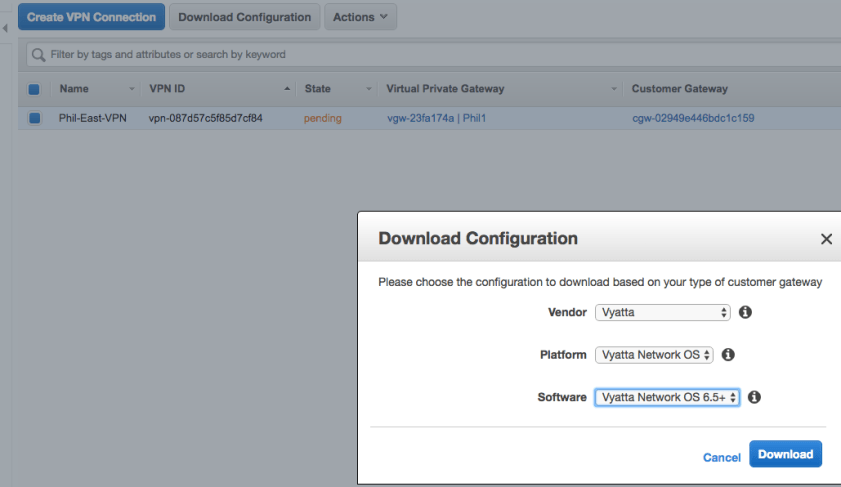
- Two IPsec tunnels are built by default for each VPN connection to keep the connection up during AWS maintenance.
- VPN connections allow static or BGP routing, but Route Propagation must be enabled for the VPN routes to be advertised into your VPC route tables.
- Direct Connect basic requirements are simply single mode 1Gb or 10Gb connection and a customer gateway capable of VLANs and BGP with MD5 Auth. BFD is automatically enabled on the AWS side, but optional on the customer side.
- Direct Connect has the unique benefit of being able to attach public VIFs to services like S3 in ANY REGION, enabling multi-region from a single direct connect.
VPC Endpoints
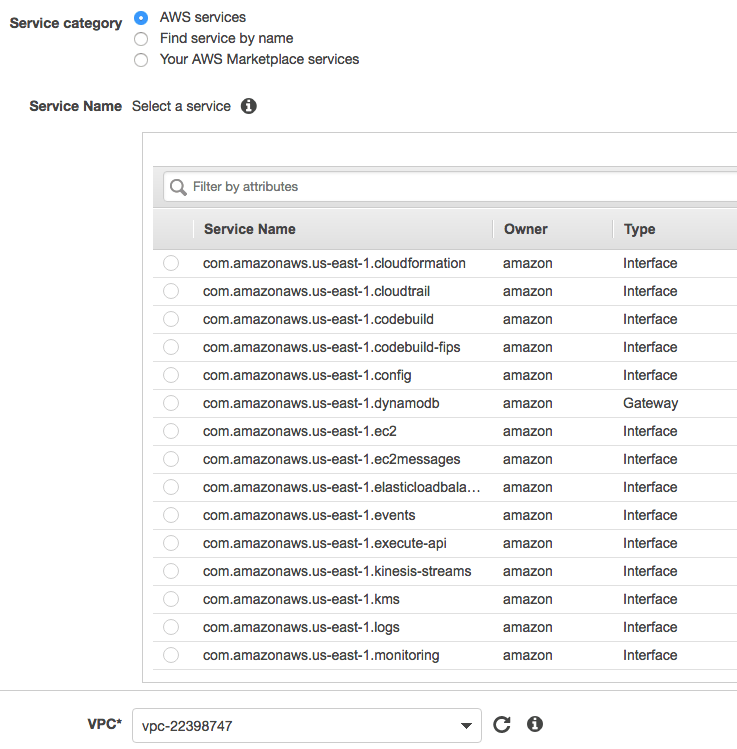
- An offshoot of AWS PrivateLink, VPC Endpoints allow you to create private pathways to public AWS services like S3, Kinesis, KMS, SNS and AWS control APIs.
- Endpoint is identified as pl-qwert123 (pl for privatelink)
- Your EC2 instances can use their private IP to reach endpoint services
- Two types of endpoints: interface and gateway.
- Interface endpoints are effectively an ENI with a private IP for traffic to the desired service. Interface endpoints support Kinesis, APIs, AWS Systems Manager, Service Catalog and endpoint services hosted by other marketplace partners.
- Gateway endpoints are a route table target for the service you are reaching. Gateway endpoints support S3, DynamoDB
- Gateway endpoint you specify the VPC, service, policy and route table:
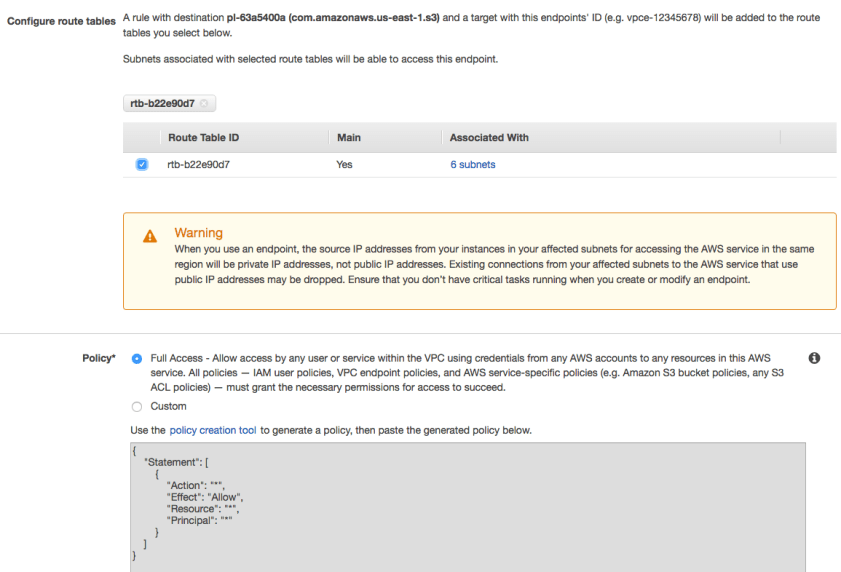
- Remember to tailor the policies of the service to expect traffic from the endpoint (e.g. S3 bucket police should access from the VPC or VPC endpoint id (pl-xxxxxxx)
VPC Peering (pcx-qwert123)
- Connect two VPCs together as if they were on a shared network. Always 1:1.
- Can be in same region (additional advantages) or different region, but must be in the same AWS partition (aws, aws-cn, aws-us-gov).
- Request accept proposal made to accountID/VPC ID. 7-day response window.
- Once established, both VPCs need to add the subnet/PCX targets to their route tables
- Overlapping CIDR blocks won’t work. Partial prefixes can be used if you don’t want to restrict yourself from an entire large block in the future.
- Within region peering allows you to:
- Reference shared security groups
- Enable DNS hostname resolution across VPCs
- Use Jumbo frames and IPv6
- Across region peering: AWS encrypts traffic between regions.
The features below primarily assist EC2 connectivity and performance:
Placement Groups
- Logical grouping of instances within single AZ for lower latency, high pkt-per-second performance and high network throughput – High Performance Computing
- Best used with instance types that support enhanced networking (v4 or v6)
- Launch all the instances you need together at the same time or you risk not being able to add later.
- Max throughput is gated by the slowest instance.
- Max combined traffic leaving the placement group is capped at 25Gbps for EC2 and S3 and 5 Gbps for all other services.
Elastic Network Interfaces
- Detachable network interface only available in a VPC and associated with a subnet.
- Must have primary IPv4 address, MAC address, at least one security group.
- Can add more private v4/v6 IP addresses, Elastic IP, one public IP.
- Attaching a second ENI to an EC2 instance gives it presence on two networks. This is common with network and security appliances. Max # of interfaces varies.
- EC2 instance and ENIs must all reside in same AZ.
- Not usable for NIC teaming (two interfaces on same subnet).
- The detachable nature makes it useful for high availability designs (e.g. detach an IP from a failing instance and reattach to a running instance).
- You cannot detach a hosts primary network interface.
- Autoscaling only supports single-interface launch configurations.
DHCP Option Sets
- VPC MUST HAVE ONE DHCP option set assigned
- Cannot be changed, but you can create and associate a new option set to VPC
- Once associated, existing servers (no restart) and all new ones use the new set.
- If you delete a VPC, the option set associated with it is also deleted.
- AWS creates and associates a DHCP option set on VPC creation:
- domain-name-server is set to AmazonProvidedDNS (must be enabled) – up to 4
- domain-name is set to the .ec2.internal
- Additional options include ntp (up to four), netbios,
Continue
[Back to AWS Networks Home]
 Network Notes