
AWS Direct Connect becomes appealing when you need more than a best-effort assurance of reachability to one or more AWS regions.
Many people think of Direct Connect as more of a privacy construct or something you use when you move to a colocation facility. But really, it’s not – both from an exam and practical perspective. Direct Connect gives you a few different capabilities:
- Deterministic bandwidth availability and latency
- Increased privacy IF you encrypt your traffic over direct connect (VPN over direct connect)
- Attach non-AWS services to your VPC (security infrastructure, legacy or license-restricted compute, VDI, high performance database or compute).
Fundamentals:
- Physical: 1 (1000base-LX) or 10 Gb (10Gbase-LR) Ethernet connection over Single Mode Fiber (1310nm) to AWS or an AWS partner. The only time you would want to use Direct Connect via a partner are when either you want to subscribe to less than 1Gb OR when Direct Connect is not available through your facility.
- Redundancy in a single location can be an inexact science. You can order multiple direct connect handoffs to a given region, but it is still possible for AWS Direct Connect maintenance or that rare outage to affect all of your handoffs.
- The most common AWS-provided recommendation has been to order two Direct Connect connections at the same time, and AWS will do their best to engineer them on separate physical paths as much as possible.
- Error Detection:
- (BFD) Bidrectional Forwarding Detection is optionally supported on your Direct Connect circuit. This is used to trigger faster failover when you have redundant connections.
- BGP peering will also go down with or without BFD. If you have no secondary connection you might be better off relying on a 30- to 90-second BGP failure as your official warning that AWS has gone unreachable, but if you have a redundant path the BGP outage will probably come too late for a failover to be hitless.
- Logical: 802.1Q VLANs are used to segment the direct connect to several AWS termination constructs available. A common construct from 2013-2018 was to assign one vlan to each VPC and connect a trunk with all the VPC vlans to your enterprise. Newer constructs like AWS Direct Connect Gateway are starting to change this.
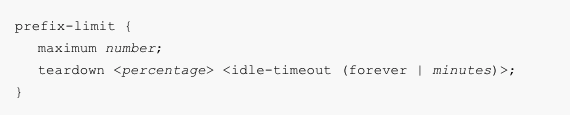
- Routing: BGP is the only dynamic routing protocol supported. From my observation, it appears AWS uses a feature in Junos called Maximum Prefix which makes very important to you never advertise more than 100 prefixes to your AWS peer construct (see feature below).
- AWS Account: An important infrastructure management and IT controls decision is which AWS account to request the Direct Connect under. Typically this is performed from either a designated master account or shared infrastructure account rather than one used by application or business teams.
AWS Construct Fundamentals (Points of Attachment)
After understanding the networking fundamentals, you need to understand the AWS constructs that are between your organization and your VPC(s).
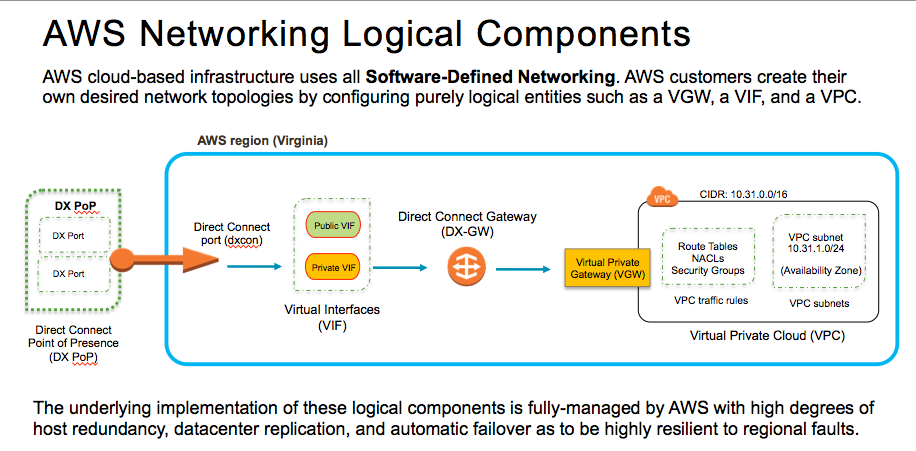
- DX PoP: The true DX PoP is an AWS-operated cage inside of a colocation provider – typically near an AWS Region. Equinix and CoreSite are examples of these colo providers. [Todo: add colo provider section. See question: Do I need to be in a colo to use direct connect?]
- DXCON: DX Port is the 1G (1000Base-LX) or 10Gb (10Gbase-LR) physical network interface and then DXCON is logical AWS construct that is your connection to AWS. Only single more fiber is permitted for this connection. If you require more than 10Gb of Direct Connect service you will likely have a bundle of 2 or 4 DX Ports (max allowed) associated with a single DXCON. You can bundle 1Gb ports as well, but in my experience if you require more than 1Gb, jumping to 10Gb is something you won’t regret.
- Virtual Interface
 Network Notes