
You need a VGW regardless of how you connect your VPC to private infrastructure –
- Virtual Private Gateway is an AWS-managed gateway for your VPC, and it is used for both VPN and Direct Gateway. It is created and “attached” to the VPC
- Create the VGW under VPC and give it a BGP Autonomous System Number (specify AWS default or give your own preferred) and then attach to a VPC.
- ASN cannot be changed after creation.
- VPC can have only 1 VGW, and it can be detached if you need to change VGWs.
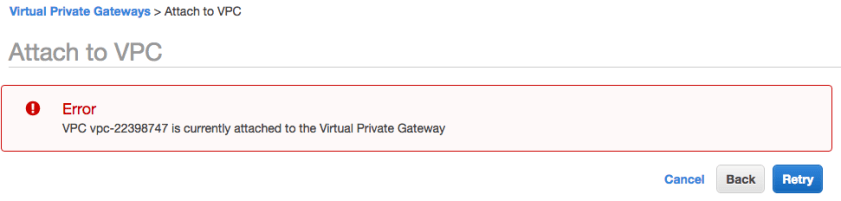
- You receive an error if you try to attach a second VGW to your VPC
- With VPNs, the VGW provides an additional level of resiliency because it establishes egress points in two Availability Zones

- Site-to-Site IPSec VPN connects your private network (wherever it is – data center, small office, home, Digital Ocean, Azure, even another VPC) to your VPC over public internet. VPC only supports this type of VPN.
- By default you receive TWO VPN connections to AWS. This is most useful for avoiding outages when AWS performs maintenance. In my time with AWS this has happened no more than once per year, but never happens at a convenient time.
- VGW is the preferred VPN termination point. Creating an internet-accessible EC2 instance inside of your VPC is a secondary option for custom requirements.
- AES 256, SHA2, Phase 1 DH groups 2, 14-18,22,23,24 Phase 2 add 1 and 5
- VGW does not have backward compatibility with older protocols
- Static and BGP routing only (standard TCP port 179)
- Max 100 propagated routes before AWS terminates the peering session.
- No debug information since VGW is a managed entity. AWS TAC can provide.
- VGW support only IPSec VPN in ESP mode. Less secure options are a reason for some VPCs to use the EC2 VPN option.
Internet Protocol Security (IPSec) Basics
- Suite of protocols to provide Confidentiality (encryption), Integrity (prevent data corruption) and Authentication (keys and certificates).
- Core components are:
- IPSec Authentication Header (AH – IP protocol 50) to allow parties to verify authenticity
- Encapsulating Security Payload (ESP – IP Protocol 51)
- Supporting components include Encryption Hashing Algorithms, Security Policy Associations, Internet Key Exchange (IKE) Key Management
- Protocol Options for IPsec Functionality:
- Confidentiality: DES, 3DES, AES
- Integrity: MD5, SHA
- Authentication: Preshared Keys, RSA
- Key Exchange Algorithms: DH1, DH2, DH5, DH7
- IPSec connection establishment happens in two phases:
- IKE Phase 1 – endpoints authenticate and agree on a keying material and create session keys
- AWS requirement for this uses preshared keys.
- IKE Phase 2 – endpoints use the new secure tunnel to negotiate Security Associations that are used to encrypt the traffic. A separate tunnel is created for the data transport.
- AWS allows AES 128- or 256-bit encrtyption, SHA-1 or 2 (256) Hashing
- AWS uses DH Perfect Forward Secrecy or other supported DH groups
- IKE Phase 1 – endpoints authenticate and agree on a keying material and create session keys
- IPSec Transport Mode encrypts only the payload, leaving IP header unprotected. Not supported in AWS.
- IPSec Tunnel Mode builds a new IP header, so even the original IP header is encapsulated in the tunnel. AWS VPN Concentrator (Juniper) only supports tunnel mode. Packet fragmentation is performed prior to encapsulation.
- Firewall requirements to allow IPSec communication to flow:
- IP Protocol 50 (ESP) in/out
- IP Protocol 51 (AH) in/out
- UDP port 500 in/out
- Optional UDP 4500 (NAT-Traversal)
- IPSec VPN routing can be static or dynamic (BGP)
- BGP peering must have tunnels bound to logical interfaces (route-based VPN)
- BGP peering must support dead peer detection
- Charged at 5 cents per connection hour, regardless of status.
- VPN Limits on your account:
- 50 customer gateways and 50 VPN connections per region
- 5 Virtual Private Gateways per region
- 10 VPN connection per VPC (per VPG)
Setting up the VPN
- Create the Virtual Private Gateway and Attach to your VPC:

2. Create a Customer Gateway (basically provide AWS with the device type and public IP address of your on-premise VPN termination).
3. Create a VPN connection which binds your VGW and CGW.

4. Download and Apply the VPN configuration file for your on-premise device.
5. Generate traffic from your on-premise network to AWS to initiate the VPN connection. The Customer Gateway must initiate the VPN connection, and with many appliances it requires either keepalive traffic or traffic destined to the VPC (“interesting traffic”)
 Network Notes